
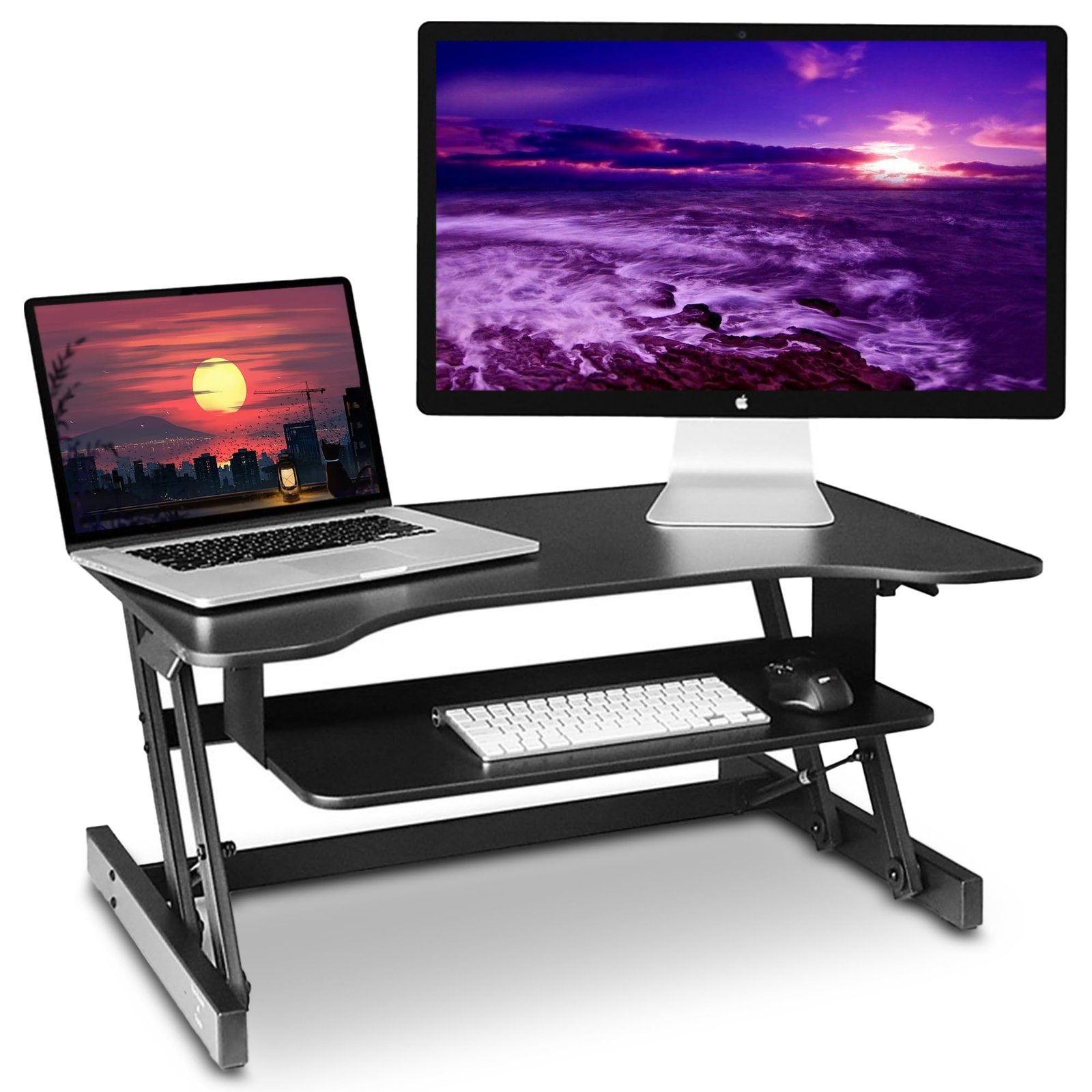
A riser desk is a simple way to turn your existing desk into a more flexible standing workstation without replacing the entire setup. It sits on top of your current desk and lets you raise or lower your monitor, keyboard, and other essentials to a comfortable working level.
Unlike a fixed desk, a riser supports height adjustment, allowing you to switch between sitting and standing during the day. This makes it a practical desk converter for home offices, small workspaces, and shared desks. Whether you want better workspace flexibility or a more comfortable ergonomic workstation, a desk riser can help you create a setup that fits your working style.
What Is a Riser Desk?
A desk riser is a platform that sits on an existing desk and raises your computer equipment to a comfortable standing height. It can create a standing workstation without requiring you to replace your current furniture. In simple terms, it turns one desk into two working positions.
You may also hear terms such as desk converter, standing desk converter, standing desk riser, and desktop riser. These names usually describe similar products. Unlike a height-adjustable desk, however, the converter moves your equipment rather than the entire desk.
How Does a Desk Riser Work?
The basic idea is surprisingly simple. A riser uses a lifting mechanism to move its platform upward or downward. Depending on the model, that movement may come from a gas-powered piston, spring system, crank, or electric motor. The goal remains the same: create a comfortable ergonomic position for both seated and standing work.
Most models provide a specific height range and weight capacity. Those two specifications deserve close attention because your monitors, laptop, keyboard, speakers, and accessories all add weight. OSHA recommends arranging computer components so your body can maintain neutral positions while working.
Types of Desk Risers and Standing Desk Converters
The market includes several designs. A manual desk riser uses physical force, while an electric desk riser uses a motor for movement. A gas spring desk riser or pneumatic desk riser uses stored mechanical energy to make lifting easier.
You can also choose between a dual-tier desk riser and a single-tier desk riser. Larger setups may need a full-width desk riser, while apartments, dorms, and compact offices often benefit from a compact desk riser.
| Type | Best suited for | Main advantage |
| Manual | Occasional use | Lower complexity |
| Gas spring | Frequent adjustment | Smooth movement |
| Electric | Frequent height changes | Push-button control |
| Single-tier | Laptops | Compact design |
| Dual-tier | Monitors and keyboards | Better separation |
| Full-width | Large setups | More usable space |
Benefits of Using a Desk Riser
The biggest advantage is workspace flexibility. Instead of remaining in one sitting position for hours, you can alternate between sitting and standing throughout your day. That change can also encourage more workday movement, especially when you pair it with short walks and regular breaks.
A well-adjusted converter can support ergonomic benefits, better back comfort, and less awkward reaching. It may also reduce unnecessary neck strain and shoulder strain caused by poorly positioned equipment. Still, standing alone isn’t magic. OSHA recommends changing positions regularly rather than staying fixed in one posture.
Is a Desk Riser Necessary?
Not necessarily. A converter makes sense when you already like your desk but want more workspace flexibility. It can also suit renters, remote workers, and people who don’t want to replace existing office furniture. Think of it as an upgrade rather than a requirement.
The real question is whether your current setup creates problems. If prolonged sitting bothers you or you want more physical activity during work, a converter can help. Yet someone with a large multi-monitor setup may prefer a full standing desk because the entire surface moves together.
Desk Riser vs. Full Standing Desk: What’s the Difference?
The distinction comes down to what actually moves. A converter raises the equipment placed on it, while a full standing desk raises the entire work surface. That difference becomes important when you use several screens, heavy accessories, paperwork, or large desk-mounted equipment.
| Feature | Desk Converter | Full Standing Desk |
| Existing desk | Yes | Usually replaced |
| Moving area | Converter platform | Entire desk |
| Installation | Usually simpler | More involved |
| Large equipment | Model dependent | Generally easier |
| Cost | Usually lower | Usually higher |
| Long-term use | Flexible upgrade | Complete workstation |
A converter can therefore be a practical standing desk alternative. A full desk may make more sense when you’re building a long-term workstation from scratch.
Manual vs. Electric Desk Riser: Which Should You Choose?
A manual model keeps things straightforward. A mechanical lever or spring system provides the lifting force without requiring an outlet. A crank mechanism works differently because you turn a handle to change the platform height. These designs suit people who adjust positions occasionally.
An electric desk riser offers greater convenience. A motorized desk riser can provide push-button adjustment and, on some models, height presets. If you switch positions many times each day, that convenience can become valuable. Electric models usually cost more and require power.
| Feature | Manual | Electric |
| Power | Not required | Required |
| Adjustment | Hand-operated | Button-operated |
| Convenience | Good | Excellent |
| Price | Often lower | Often higher |
| Frequent changes | Less convenient | Very convenient |
How to Set Up and Use a Desk Riser Correctly
A good standing desk setup begins with your body, not the product. Set the screen so you can look forward without repeatedly bending your neck. OSHA recommends placing the top of the monitor at or below eye level and keeping the screen at a comfortable viewing distance. (OSHA)
Next, focus on keyboard positioning and monitor positioning. Your shoulders should remain relaxed, wrists straight, and elbows comfortably near your body. A suitable keyboard tray, external keyboard, or monitor stand can help when the built-in platform doesn’t fit your proportions.
Create an Ergonomic Desk Setup
Your ergonomic desk setup should let you work without constantly reaching, bending, or twisting. Keep frequently used desk accessories close to you and organize cables through simple cable management. An anti-fatigue mat may also improve comfort when standing for longer periods.
The goal isn’t to stand all day. Instead, use your workspace setup to change positions naturally. Mayo Clinic also emphasizes chair height, equipment spacing, and posture as important parts of office ergonomics.
Who Should Use a Desk Riser?
A converter can work especially well for remote employees, students, gamers, and professionals with limited space. It can also suit someone who wants a flexible home office setup without buying new furniture. For many users, the attraction is simple: keep the existing desk while gaining an adjustable workstation.
People with multiple monitors should pay closer attention to platform size and stability. Likewise, laptop users should consider an external keyboard and mouse because raising a laptop screen can also raise its keyboard. Good workspace ergonomics require the screen and input devices to work together.
Desk Riser Buying Guide: What to Look For
Before buying, measure your desk surface and check the converter’s dimensions. Then compare its height range, lifting method, and weight capacity with your equipment. A product that looks sturdy online may feel unstable when fully raised if it doesn’t match your setup.
Also check the keyboard area, monitor compatibility, base footprint, adjustment speed, and warranty. If you use a monitor arm, speakers, or other desk accessories, confirm compatibility first. A few minutes of measuring can prevent an expensive mismatch.
| Buying factor | Why it matters |
| Height range | Determines usable sitting and standing positions |
| Weight capacity | Prevents overloading |
| Platform size | Determines equipment fit |
| Stability | Reduces unwanted movement |
| Mechanism | Affects adjustment effort |
| Monitor compatibility | Important for larger setups |
| Warranty | Adds purchase protection |
Frequently Asked Questions About Desk Risers
What is a riser desk?
A desk riser is an adjustable platform placed on an existing desk. It raises your monitor, keyboard, and other equipment so you can work from a standing position without replacing the entire desk.
Are desk risers worth it?
They can be worthwhile if you want an affordable way to introduce sitting and standing into your workday. They’re especially useful when you like your existing desk or have limited space.
What is the difference between a desk riser and a standing desk?
A converter moves the equipment placed on its platform. A standing desk moves the entire desk. That makes a full desk more suitable when you need the whole surface available at both heights.
How high should a desk riser be?
There isn’t one universal number. Your ideal desk height depends on your body dimensions, chair height, monitor position, and keyboard placement. Your elbows should remain comfortable while your screen allows a neutral head position.
Are desk risers good for your back?
A converter can support better workstation positioning, but it isn’t a treatment for back problems. Proper setup, regular movement, and proper posture matter more than simply standing. OSHA recommends maintaining a neutral position and changing positions throughout the day.
Can I use a desk riser with two monitors?
Yes, provided the platform has enough space and suitable weight capacity. Check the manufacturer’s specifications carefully before adding monitor arms or other heavy equipment.
Is an electric desk riser better than a manual one?
Neither is automatically better. Manual models suit occasional adjustments and simpler setups. Electric models make frequent changes easier through powered movement and programmable settings.
Can a desk riser cause leg fatigue?
Standing for long periods can contribute to leg fatigue, especially when you stay in one standing position. Move regularly, shift your weight, and sit when needed rather than treating standing as the only healthy position.
Can you use a desk riser with a laptop?
Yes. However, raising the laptop screen can also raise the keyboard. An external keyboard and mouse can help you maintain better positioning while the laptop sits at a comfortable viewing height.
Final Thoughts
Choosing the right converter isn’t simply about finding the tallest platform. Your body, equipment, desk dimensions, and working habits all matter. A thoughtful ergonomic workstation should make movement easier without creating new positioning problems.
For occasional standing, a converter can be an effective standing desk alternative. For demanding setups, a complete adjustable desk may offer greater freedom. Either way, focus on comfort, adjustability, movement, and a workspace that fits the way you actually work.